
- Log in using your username and password.
- Go to Contribution List in the left-hand menu.
- Locate your contribution (you can search for your name using your browser's search function).
- Open your contribution and click the pencil icon next to Presentation Materials.
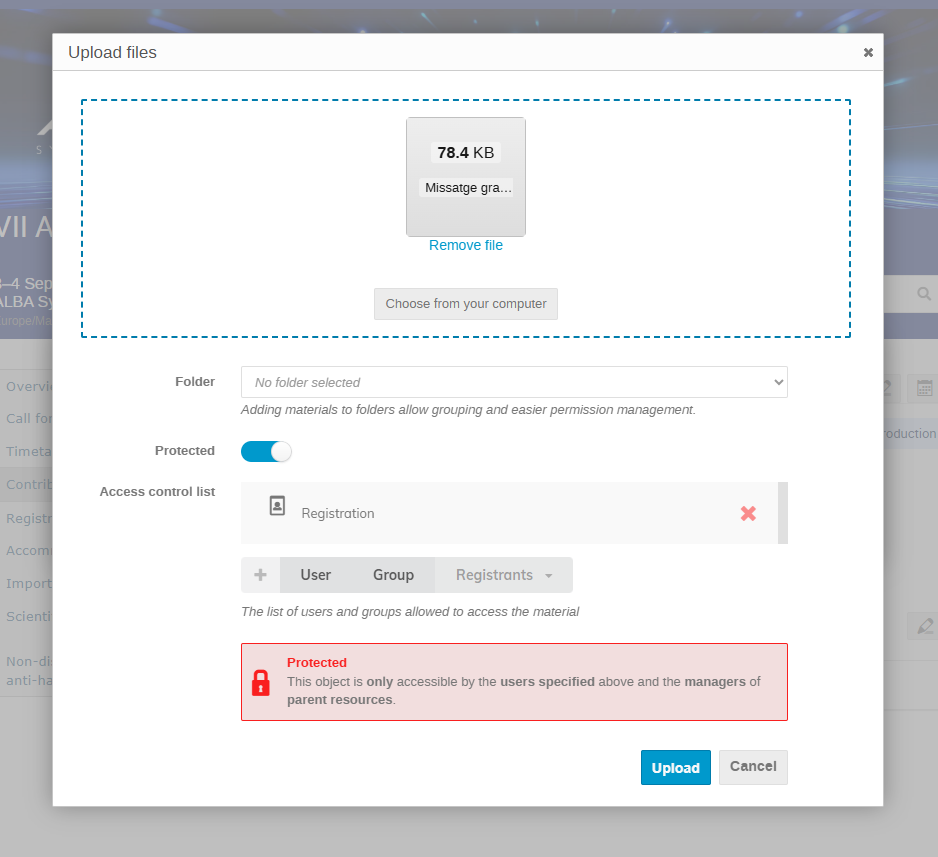
- Upload your file and set the Protection level to Registrants only.
- Login with user and password
- Go to the left menu My Conference – My Contributions
- Select your contribution and add Presentation materials, by clicking on the PENCIL icon
- Upload the file
- Important! Select Protected only for Registrants (see image below)
Remarks
- Presentation materials are intended to be publicly accessible to registered participants. If your talk includes confidential or unpublished information, we recommend uploading a simplified version of your slides instead.
- All contributors are required to complete and sign the Authorship Declaration before the meeting begins.